
Last Updated: December 19, 2025
Are you wondering why your Amazon optimization efforts aren’t working, and your products seem to slide backward instead of forward? There’s a strong chance you’re making Amazon listing optimization mistakes that quietly hurt clicks, rankings, and conversions.
When it comes to Amazon selling, listing optimization is not optional since it’s the foundation of visibility and sales. The problem is that most sellers think they’re doing it right, when small mistakes in keywords, images, and content are doing real damage.
Those mistakes add up fast and push your products deeper into the sea of over 600 million items on Amazon. Learning where listings go wrong is the first step to fixing them and staying visible to buyers who are ready to purchase.
In this blog, our Amazon agency breaks down the 10 most common listing optimization mistakes that hurt visibility, clicks, and sales, and shows how to fix them. We also share proven strategies, real-case examples, and actionable tips to help sellers boost conversions and grow their Amazon business.
Table of Contents
Optimize Your Listings Today
Struggling with low clicks and poor conversions? Let our Amazon agency audit your listings and implement strategies that get results.
Top 10 Amazon Listing Optimization Mistakes and How to Solve Them
Even the most experienced sellers can unknowingly sabotage their own listings with small errors. Here are the most common Amazon listing optimization mistakes that hurt visibility, clicks, and sales, and how to avoid them.
Mistake 1: Poor Keyword Research and Usage
Keywords are the bridge between your product and potential buyers on Amazon. When sellers guess keywords, rely only on short-tail terms, or stuff irrelevant phrases, their listings can disappear from search results and fail to attract clicks.
Neglecting proper keyword research hurts visibility, sales, and even the customer experience, because shoppers can’t find or understand your product. The solution is to use dedicated tools, target long-tail and relevant terms, and integrate them naturally across titles, bullet points, descriptions, and backend fields while updating them regularly to match trends.
Mistake: Using irrelevant keywords or not enough keywords.
Solution:
- Conduct thorough keyword research:
- Use Amazon search bar suggestions.
- Try keyword research tools (Jungle Scout).
- Analyze competitor keywords.
- Include relevant keywords naturally in your product listing:
- Title
- Bullet points
- Description
Mistake 2: Incomplete Product Titles
Your product title is the first thing shoppers see, and a weak or confusing title can turn them away before they even click. Many sellers either leave titles too vague or overload them with irrelevant information, which hurts both clicks and conversions.
Incomplete titles also damage SEO by missing essential keywords and can even trigger mobile truncation or listing suppression. The fix is to craft clear, benefit-driven titles that include key details like brand, size, and color, while staying concise and integrating high-intent keywords naturally.
Mistake: Unclear and stuffed product titles that are too vague or have too much information.
Solution:
- Craft clear and concise titles:
- Include key features and benefits.
- Use relevant keywords.
- Keep it short and sweet:
- Follow Amazon’s character limit guidelines.
- Focus on what your product is and does.
Mistake 3: Lack of Compelling Product Descriptions
A product description is your chance to sell before the buyer even clicks “Add to Cart”, but many listings fail because the text is generic or confusing. When descriptions don’t highlight benefits, answer questions, or explain why the product matters, shoppers quickly move on to competitors.
Weak descriptions also hurt conversions and engagement by making listings feel incomplete or untrustworthy. The solution is to focus on benefits over features, use bullet points for readability, naturally include relevant keywords, and leverage A+ Content when possible to tell a richer, persuasive story that convinces buyers to purchase.
Mistake: Generic descriptions that don’t focus on the product.
Solution:
- Focus on benefits:
- Don’t just list features.
- Explain how your product makes life better.
- Highlight what’s special:
- What makes yours unique?
- Use bullet points to showcase notable features.
Mistake 4: Not Optimizing the Main Image
Your product listing’s main image is the first thing shoppers notice, and a poor image can turn them away before they even read your title. Common mistakes like low resolution, excessive white space, or unclear product views reduce clicks, hurt trust, and lower your listing’s visibility.
Not optimizing this prime real estate can cost sales and suppress your listing in search results. A strong main image should fill the frame, be zoomable, clearly show the product, use a clean background, and stand out from competitors to grab attention and encourage clicks.
Mistake: Main image unclear, low-quality, or not attention-grabbing
Solution:
- Use high-resolution images that fill at least 85% of the frame.
- Ensure the product is clearly visible and not cropped.
- Use a clean, usually white, background to make the product pop.
- Make images zoomable so buyers can inspect details.
- Stand out by analyzing competitors and creating a better, value-driven image.
Mistake 5: Neglecting Customer Reviews
Customer reviews contribute to building credibility, boosting exposure, and increasing sales on Amazon since 95.3% of shoppers read reviews before purchasing, yet many sellers ignore them. Failing to respond to feedback or encourage reviews can make your listing look untrustworthy and reduce buyer confidence.
Neglecting reviews also hurts your ranking because Amazon favors products with active engagement and positive feedback. Ignoring insights from reviews means missing opportunities to improve your listing, address customer pain points, and optimize future products for better sales.
Mistake: Neglecting customer feedback.
Solution:
- Encourage customers to leave reviews (within Amazon’s guidelines).
- Respond to all reviews, positive or negative, to show you care.
- Positive reviews boost credibility and ranking.
Mistake 6: Mismanaged Product Categories and Attributes
Choosing the wrong category or leaving key attributes blank can seriously hurt your product’s visibility on Amazon. When listings are miscategorized, your product may appear to shoppers who aren’t interested while missing the audience most likely to buy.
Missing or inaccurate attributes like size, color, or material can lead to suppressed listings and a poor customer experience. Properly managing categories and attributes ensures your product appears in relevant searches and browse paths, improving both discovery and conversions.
Mistake: Mismanaged product categories and attributes.
Solution:
- Research Amazon’s categories and attribute guidelines.
- Use relevant keywords in your attributes.
- Ensure your product appears in relevant searches and browsing categories.
Mistake 7: Ineffective Use of Backend Keywords
Many sellers either ignore backend keywords or fill them with irrelevant terms, thinking they don’t matter. This mistake limits search visibility and prevents your product from showing up in relevant customer searches.
Repeating front-end keywords, exceeding character limits, or only using broad terms wastes valuable backend space. Properly optimized backend keywords include relevant synonyms, misspellings, and long-tail phrases, helping your listing rank for more searches without cluttering the visible content.
Mistake: Ineffective use of backend keywords.
Solution:
- Research and include relevant backend keywords:
- Use terms customers might search for but aren’t in your title/bullet points.
- Describe your product accurately and avoid keyword stuffing.
Mistake 8: Overlooking Competitor Analysis
Failing to study competitors means missing valuable insights on keywords, pricing, and customer preferences. Without this knowledge, your listings can end up generic, failing to stand out or rank effectively against similar products.
Ignoring competitor reviews and listings also prevents you from identifying gaps or opportunities to improve your product and messaging. Learning from what works (and what doesn’t) for others helps you refine your unique value proposition and attract more buyers.
Mistake: Overlooking competitor analysis.
Solution:
- Analyze competitor listings, pricing, keywords & reviews:
- Identify gaps in the market and unique value propositions.
- Learn from their successes (and avoid their mistakes).
Mistake 9: Poorly Managed Pricing Strategies
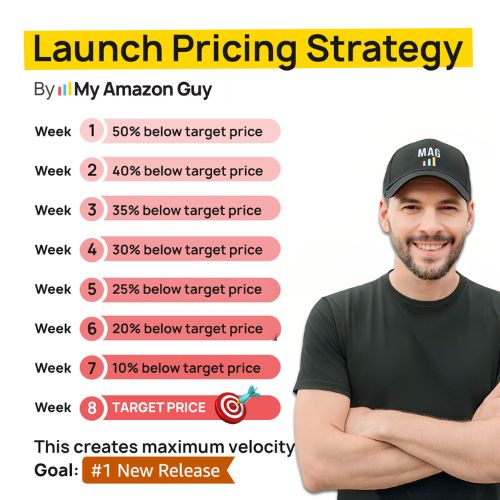
Setting prices too high or too low can confuse buyers and reduce clicks, making your product appear untrustworthy or overpriced. Many sellers ignore market trends or competitor pricing, which causes them to miss opportunities and lose potential sales.
Static pricing or pricing that strays too far from Amazon averages can also trigger warnings or even deactivation. The solution is to use dynamic, data-driven pricing, monitor competitors, and balance perceived value with profitability to maximize both clicks and conversions.
Mistake: Poorly managed pricing strategies.
Solution:
- Conduct competitive pricing analysis:
- Understand market trends and customer expectations.
- Consider these factors when setting prices:
- Product quality, brand reputation, perceived value.
- Regularly review and adjust your pricing strategy:
- Based on market conditions and competitor actions.
Mistake 10: Inadequate Optimization for Mobile Users
With 1.65 billion mobile shoppers globally, failing to optimize your Amazon listings for mobile is a major mistake. Many sellers overlook how their titles, descriptions, and images appear on small screens, which can frustrate shoppers and reduce clicks.
Poor mobile optimization leads to truncated titles, unreadable text, and images that don’t show product scale or benefits clearly. The solution is to create concise, visually-driven listings with key info upfront, high-resolution images, bullet points, and mobile-friendly A+ Content to capture attention and drive conversions.
Mistake: Inadequate mobile optimization.
Solution:
- Ensure your listing looks great on mobile devices:
- Optimize product images, titles, descriptions, and CTAs for smaller screens.
- Test your listings on various devices for fast loading and proper display.
- Capture every sale, no matter the device!
Boost Your Amazon Sales
Avoid costly mistakes and make every listing count. Our experts handle keyword research, images, and A+ content for maximum impact.
Proven Amazon Listing Optimization Strategies for Boosting Sales
There are proven ways for sellers to fix common listing mistakes and improve both visibility and conversions. These optimization strategies help your products stand out, attract more clicks, and ultimately boost sales on Amazon.
1. High-Quality Images
Use professional, high-resolution images that clearly showcase your product and its benefits. Images should fill the frame, highlight key features, and help shoppers visualize using the product.
2. Optimized Titles & Bullet Points
Craft titles and bullet points that include core keywords and essential product details. Focus on benefits and features in a concise, scannable format to improve both search ranking and conversions.
3. A+ Content
Enhance your listing with A+ Content, including detailed descriptions, rich visuals, and alt text for images. This creates a more compelling, trustworthy presentation that helps shoppers understand your product’s value.
4. Competitive Pricing & Avoiding Suppression Triggers
Set prices based on market trends and perceived value while avoiding Amazon listing errors that can suppress visibility. Monitor competitors and adjust pricing to stay attractive without compromising profit or quality signals.
5. Target “Strike Zone” Keywords & Badges
Use high-intent keywords that drive clicks and conversions, and highlight badges like the Small Business Badge when eligible. These small signals can increase trust, discoverability, and buyer confidence.
6. Case Study Analysis
Regularly analyze high-performing listings in your niche to see what works. Learn from competitor strategies and apply insights to your own listings for measurable improvements.
From Blunder to Bestseller: Avoid These Listing Landmines
This ASIN review video highlights common listing mistakes and shows step-by-step strategies to fix them. It offers visual guidance to help sellers identify weaknesses and improve their Amazon product pages.
The video reinforces the importance of avoiding pitfalls like poor keyword usage, incomplete titles, and neglecting customer reviews. By following these strategies, sellers can turn underperforming listings into high-converting, visible products.
Optimizing Your Catering Tray Listing for Amazon Sales
Optimizing your product listing goes beyond basic fixes because it’s about creating a page that converts browsers into buyers. Using a real example like a catering tray, we can demonstrate how strategic images, keywords, and content work together to boost sales.
1. Image Presentation
Avoid floating products in your images. Placing catering trays on a box or in context clearly showcases functionality and improves click-through rates.
2. Keyword Optimization
Include relevant keywords in your title and bullets, such as “Sushi”, to accurately reflect the product’s use cases and improve discoverability. Remove irrelevant details like “warranty” and focus on key benefits like “Leakproof” and “Durable.”
3. Compelling Content Creation
Craft detailed product descriptions covering dimensions, materials, and ideal uses to educate shoppers. Enhance your listing further with A+ Content modules like brand stories and high-quality visuals to elevate the customer experience.
Case Study: Amazon Listing Optimization for Tent and Table
Tent and Table, a 25-year-old provider of commercial-grade bounce houses, wedding tents, and inflatables, faced challenges with fragmented catalog architecture and unoptimized product content. Their listings lacked proper Amazon list optimization for tents and inflatables, which led to suppressed listings, poor conversions, and confused customers.
Our Amazon agency stepped in with a full-service strategy, including catalog management, listing optimization, and content refreshes. We implemented advanced SEO, refined creative assets, and developed seasonal content strategies to capture search trends and maximize sales during peak periods.
The results were dramatic: conversion rates increased by 50-100%, and Tent and Table achieved a 167% year-over-year revenue growth in June 2022. Operational fixes like GS1 UPC updates, inventory compliance improvements, and B2B pricing strategies further strengthened profitability, proving the value of professional listing optimization for sustained Amazon success.
FAQs About Amazon Listing Optimization Mistakes
Why is Amazon listing optimization important?
Optimized listings improve visibility, attract more clicks, and increase conversion rates by matching customer search intent. Without proper optimization, even high-quality products can get buried under millions of competing listings.
What are the main reasons Amazon listings fail?
Listings often fail due to poor keyword usage, incomplete titles, unoptimized images, and weak product descriptions that confuse shoppers. Other common issues include neglected customer reviews, mismanaged categories, and a lack of mobile optimization.
How can sellers fix underperforming listings quickly?
Focus on updating titles, bullet points, images, and backend keywords while addressing customer feedback and compliance issues. Leveraging professional Amazon listing optimization strategies can also boost visibility and conversion faster than trial-and-error adjustments.
Don't Let Listing Mistakes Sink Your Sales: Mastering Amazon Optimization
Amazon listing optimization mistakes can be the reason why your products aren’t reaching the right customers or converting clicks into sales. Learning about these mistakes is essential to prevent lost visibility, poor engagement, and wasted advertising spend.
Understanding how to fix common listing errors, from weak titles and images to neglected keywords and reviews, can significantly boost your product performance. By applying the strategies outlined in this article, sellers can improve conversions, rank higher in search results, and stand out from the competition.
Do you need help optimizing your Amazon listings? Contact our full-service Amazon agency and let our team audit your listings, implement proven optimization strategies, and help you maximize visibility and sales.
Turn Browsers Into Buyers
Stop losing sales due to weak listings. We optimize titles, bullets, backend keywords, and more to drive visibility and conversions.